🆓 Free & open source · MIT license · runs on your computer

The free, open-source trading journal for MetaTrader 5

Every MT5 trade syncs automatically. Review your P&L calendar, journal your setups and emotions, and get an AI coach that tells you, per instrument, what's working and what's losing you money.

Works with any MT5 broker or prop-firm account · macOS, Windows & Linux · no API key needed
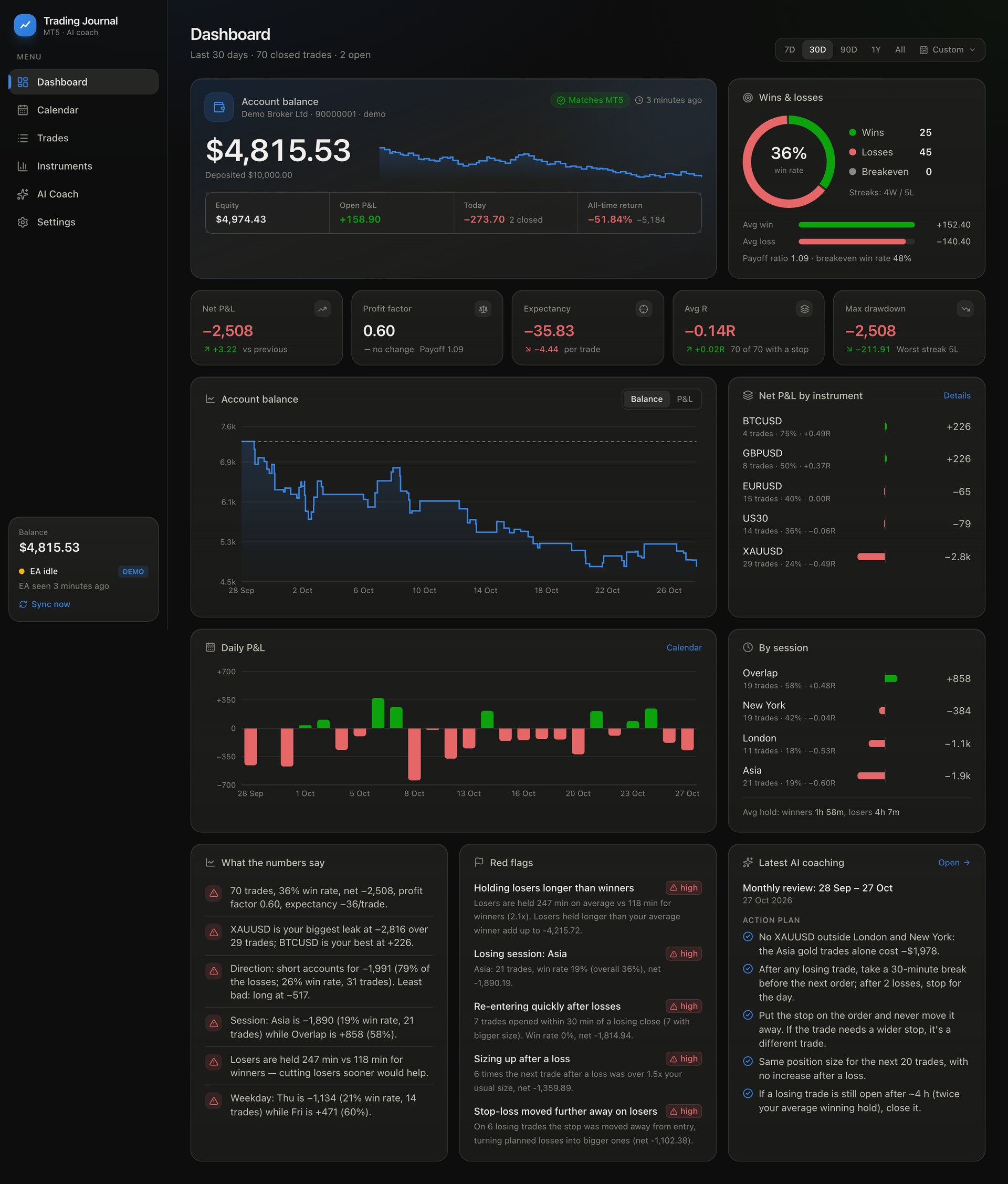
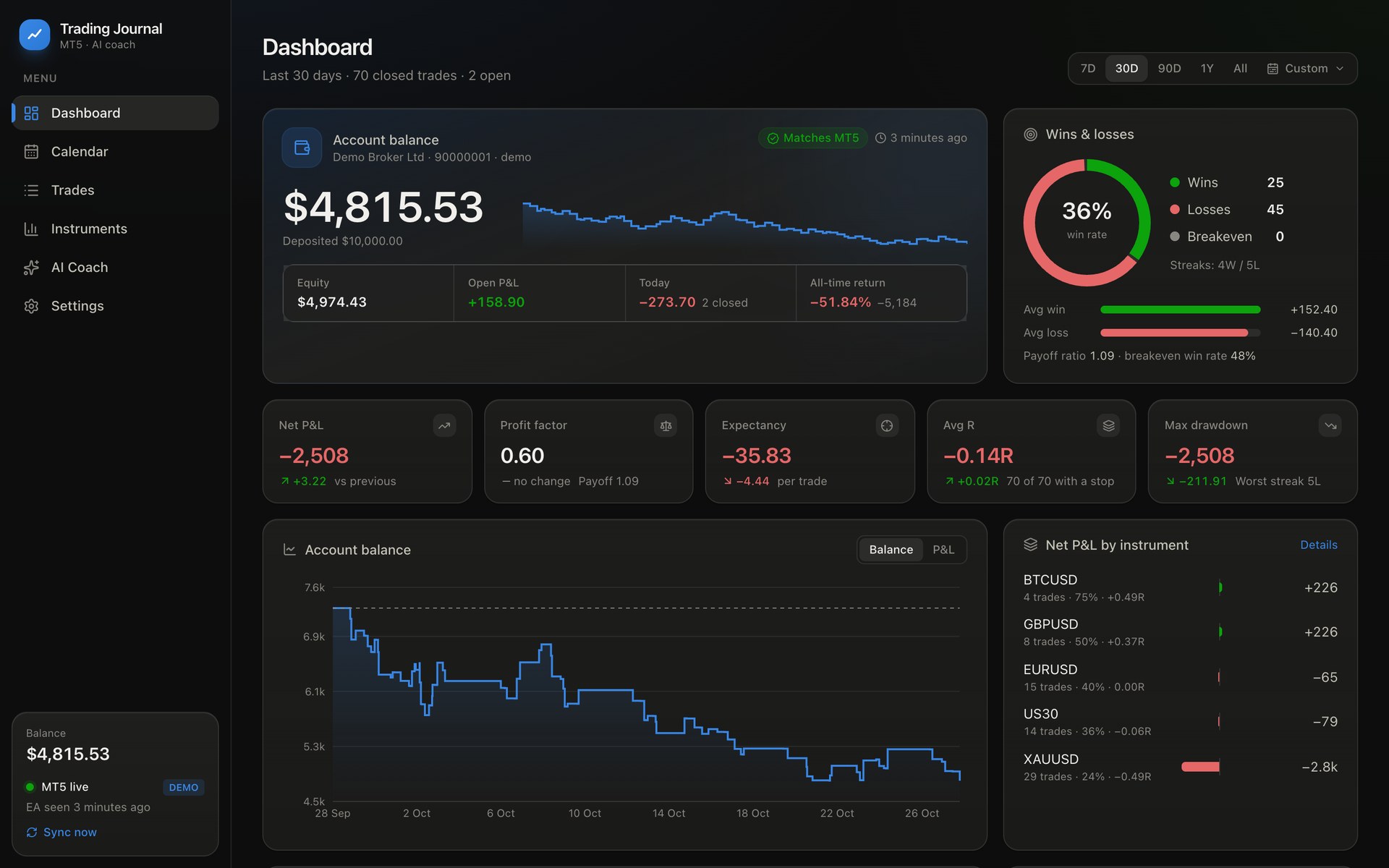
MT5 trading journal dashboard showing account balance, win rate, profit factor and balance curve

See it in 30 seconds

Dashboard, custom date ranges, P&L calendar, a journaled trade, instrument analytics and an AI coaching review. Shown on the built-in demo account.

Everything a trading journal should do, done for you

No spreadsheets and no copy-pasting from MT5. Attach a read-only Expert Advisor once and the journal stays up to date on its own.

⚡

Automatic MT5 sync

Full history on day one, then every fill within seconds, including partial closes, commissions, swaps, stop changes and MFE/MAE.

💰

Live account balance

Balance, equity, open P&L and all-time return, reconciled against MT5 to the cent.

📅

P&L calendar

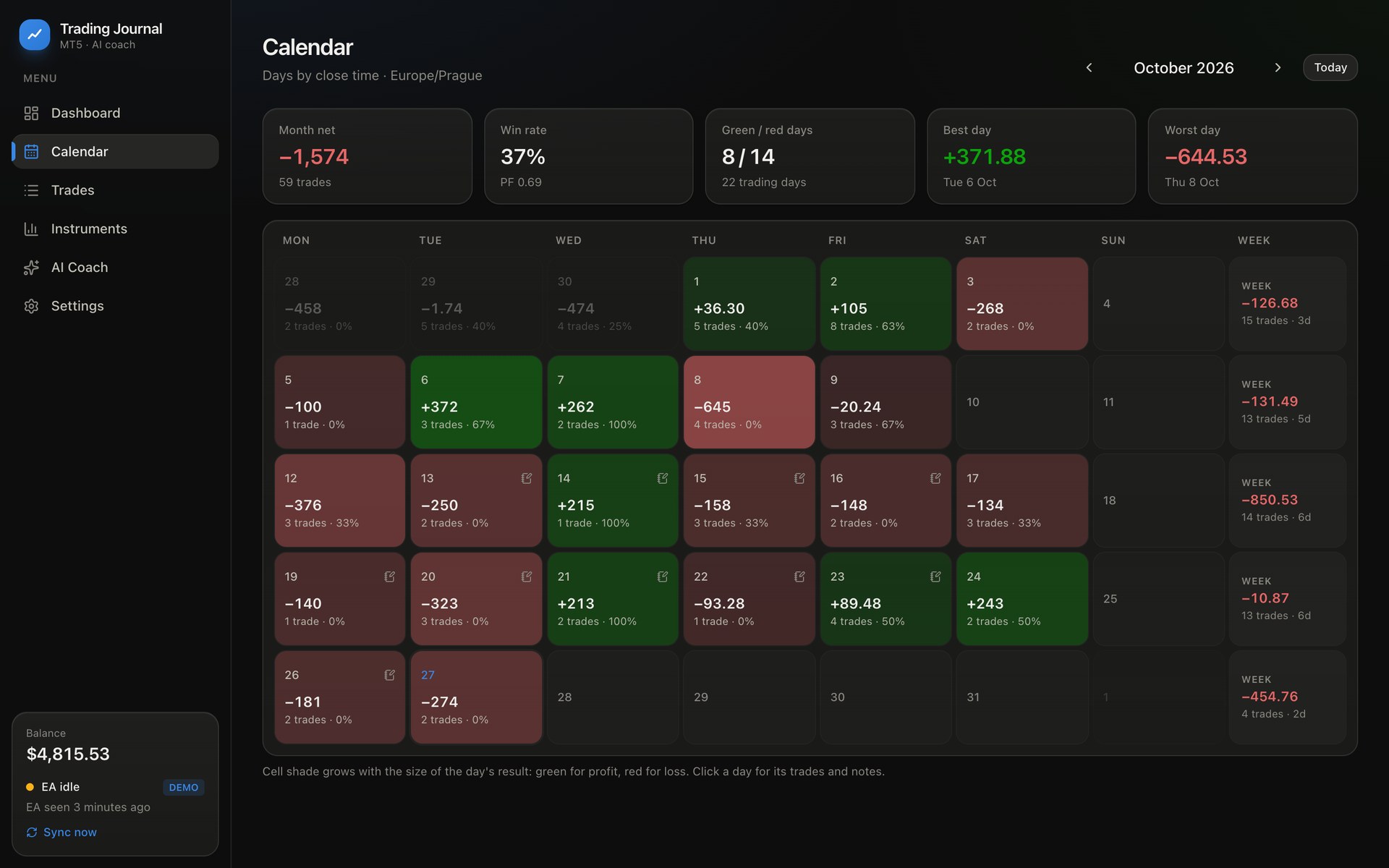
Green and red days at a glance, weekly totals, and a daily plan, review and mood.

🧾

Per-trade journal

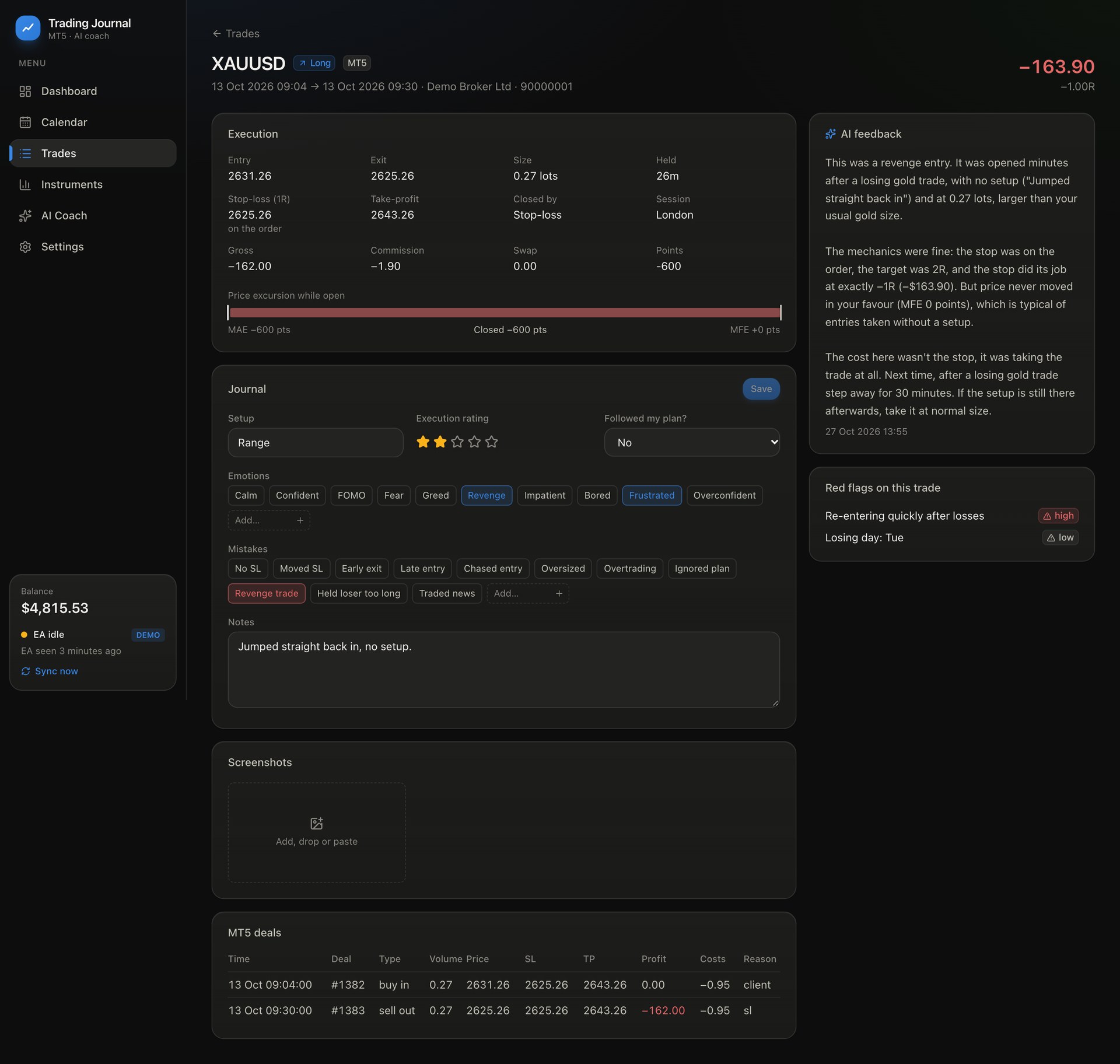
Setup, emotions, mistakes, rating, notes and chart screenshots, with R-multiple and price excursion on every trade.

🚩

Red flags with a price tag

Revenge trading, overtrading, widened stops, early exits, sizing up after losses, each with what it cost you.

🤖

AI trading coach

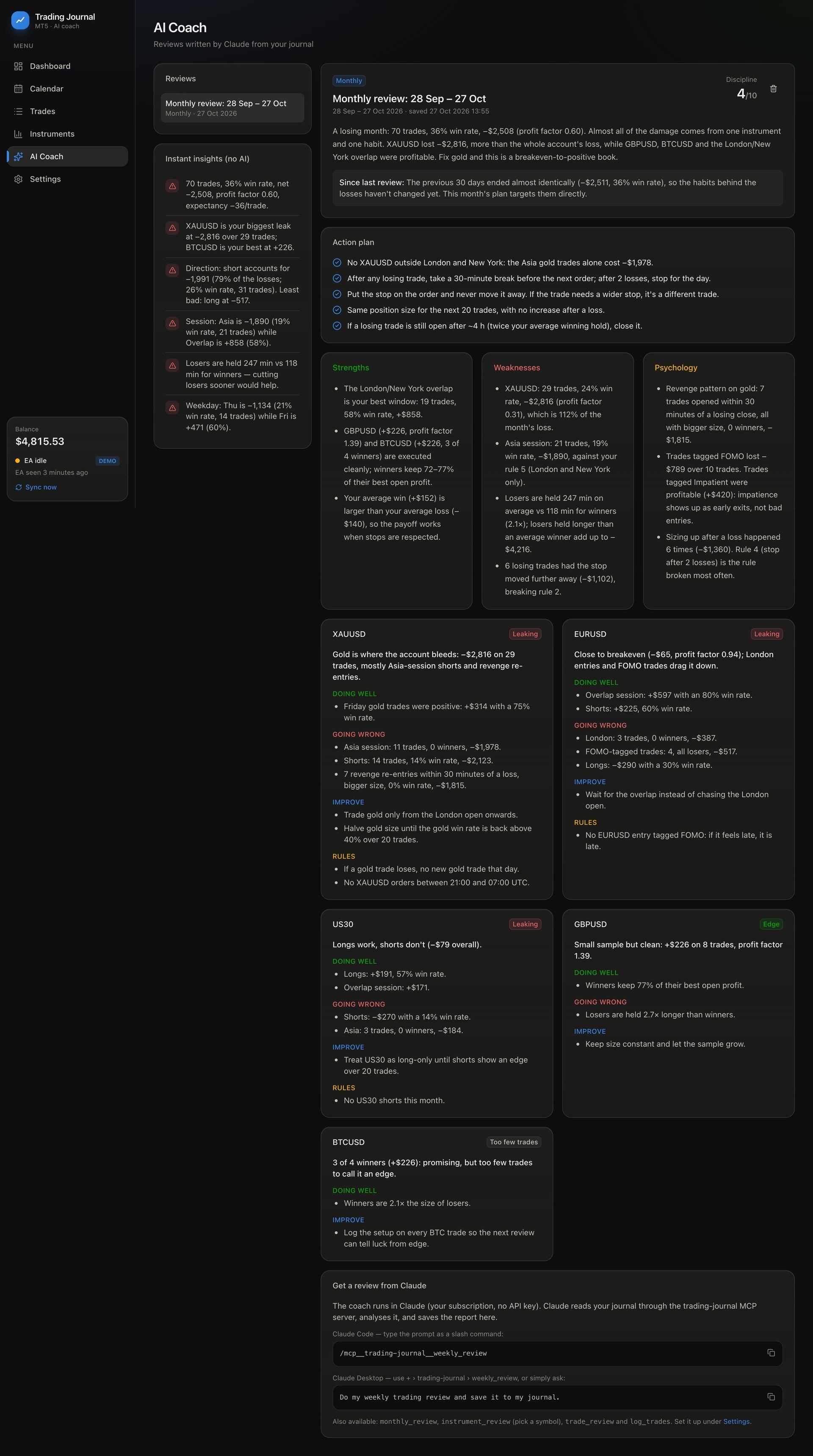
Claude reviews your week or month per instrument, checks you against your rules and saves an action plan.

Know where your money goes

Every metric compares against the previous period. Pick 7 days, 30, 90, a year, all time, or any custom date range.

  • Win rate, profit factor, expectancy, average R, max drawdown
  • Balance curve built from MT5 deals
  • Breakdowns by instrument and session
Trading performance dashboard with balance curve and daily profit and loss

A calendar that tells the story

Each day is shaded by its result. Click it to see the trades and write your pre-session plan and post-session review.

Trading P&L calendar with daily results

Every trade, honestly measured

See whether the stop was on the order or added later, whether you widened it, how much of the move you kept, and what Claude thinks of the execution.

Trade journal entry with R multiple, MFE MAE, emotions, mistakes and AI feedback

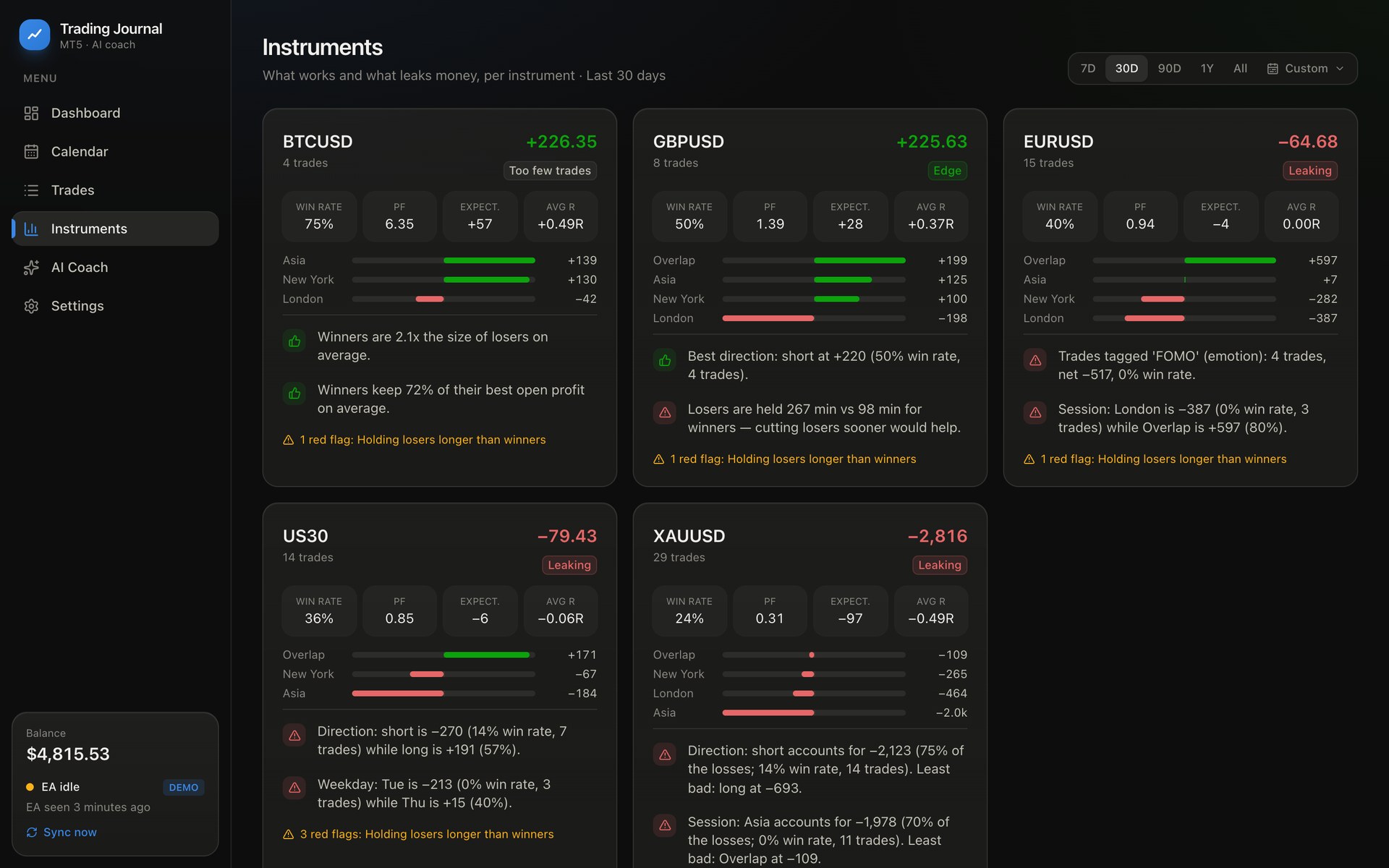
Edge or leak, per instrument

Forex, gold, indices and crypto each get a verdict, their own equity curve, and insights like "Asia session accounts for −$1,978 on XAUUSD".

Per-instrument trading analytics for EURUSD, XAUUSD, US30, BTCUSD

An AI trading coach that reads your journal

Connect Claude Desktop or Claude Code through MCP, on your own Claude plan with no API key. Talk or type; Claude reads your stats, tags your trades and writes reviews into the app.

My last gold trade was a breakout. I felt FOMO and entered late. Rate it 2/5.
Added to your XAUUSD long from 14:05: setup Breakout, emotion FOMO, mistake Late entry, rating 2/5.
Do my monthly trading review.
Gold is where the account bleeds: −$2,816 on 29 trades, mostly Asia-session shorts and revenge re-entries. Rule for next month: no XAUUSD orders between 21:00 and 07:00 UTC. Saved to your AI Coach page.
Example exchange, based on the demo account.
AI trading coach monthly review written by Claude

Set up in five minutes

You'll need uv, Node.js 20+ and MetaTrader 5. Claude Desktop is optional, for the AI coach.

Install

git clone https://github.com/gillani-hello/ai-trading-journal.git
cd ai-trading-journal
uv sync
cd web && npm install && npm run build && cd ..

Connect MetaTrader 5

uv run tj install-ea

Then drag TradeJournalSync from Navigator › Expert Advisors onto any chart. It's read-only and never trades.

Open your journal

uv run tj serve        # http://127.0.0.1:8000

Connect Claude (optional)

uv run tj mcp-config --write-desktop

Restart Claude Desktop, then ask: "Do my weekly trading review."

Full setup guide, Windows/Linux notes and every command →

FAQ

Is this trading journal really free?

Yes. It's MIT-licensed open source, with no subscription, trial or paywall. The AI coach uses the Claude plan you already have.

Does it work with my broker or prop-firm account?

If you can open the account in MetaTrader 5, yes: demo, live and challenge accounts, hedging or netting.

Does the Expert Advisor trade?

No. It only reads history and writes files to MT5's shared folder. It never places, modifies or closes trades.

Where is my data stored?

On your computer, in a local SQLite database. Nothing is uploaded.

Do I need an API key for the AI coach?

No. It runs in Claude Desktop or Claude Code on your normal Claude plan, connected via the Model Context Protocol (MCP).

Does it support MetaTrader 4?

Not yet. The export EA is MQL5; an MQL4 version is on the roadmap.

Support the project ❤️

If this journal helps your trading, you can support its development with crypto. Always double-check the network before sending.

A ⭐ on GitHub also helps other traders find it.